Step-by-step guide · 12 min
For anyone who has sold, or is thinking of selling, a home or a building plot in Portugal and wants to know how much income tax the profit will cost. In about 12 minutes you get an estimate of the tax, the cash you keep and the effect of reinvesting in a new home.
- For beginners: every term explained
- Numbered screenshots of the calculator
- Interactive chart and a PDF to download

1. What this calculator does
When you sell a property for more than it cost you, the profit is a capital gain (in Portuguese, mais-valia). For an individual, it is taxed under IRS, Portugal’s personal income tax. This calculator does the maths for you: it starts from the sale value, subtracts the purchase value adjusted for inflation, the costs and the improvement works, and shows how much extra IRS the sale adds to your tax bill.
The key rule is simple: only half (50%) of the gain is taxed. That half is added to your other income for the year (this is called englobamento, aggregation) and taxed at your marginal rate, the rate of the highest IRS bracket you reach. Since 2023 this applies to residents and non-residents alike. The calculator also handles the reinvestment exclusion for a new main home and homes bought before 1989.
It does not cover: companies (IRC), property held in a business, sellers in tax havens, reinvestment in retirement products (65+) or in moderate-rent housing (2026–2029), or any tax your country of residence may charge on the same gain. The IRS is simplified: no tax credits (health, education and so on) and no minimum-subsistence rule. For property in the Azores no IRS table is available, so the tax shows as unknown.
All results are educational estimates, not tax advice. Before you sell or file your return, always check the figures with a qualified lawyer or tax adviser in Portugal.
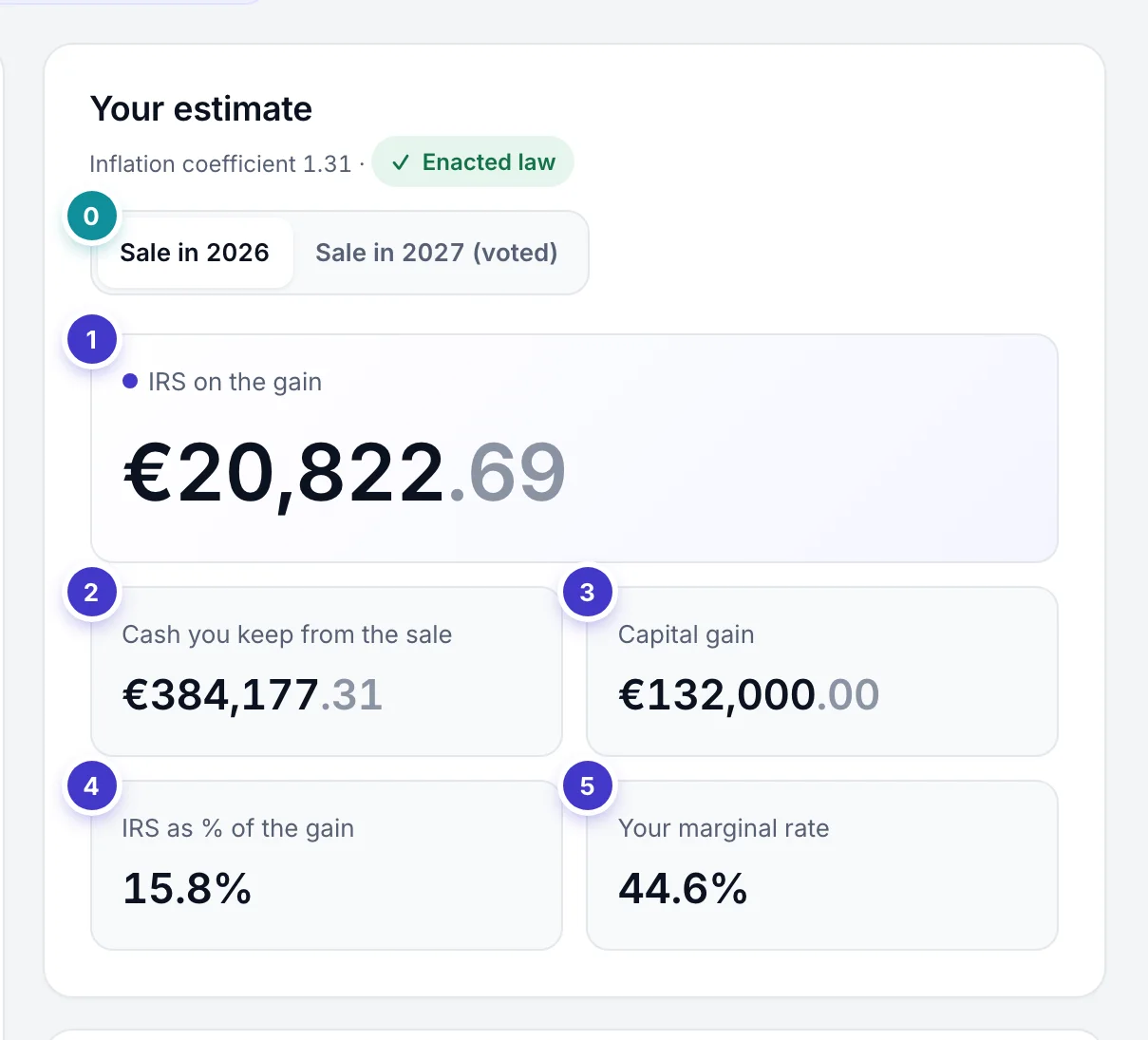
What you will see at the end: the main result, explained in section 4.
2. Before you start: what you need
Have these at hand. If one is missing, the calculator tells you what is unknown — it never treats it as zero.
Purchase deed and IMT receipt
They show the date and value of your purchase. The value that counts is the one IMT (the property transfer tax) was charged on: the higher of the price and the VPT at the time. If you inherited the property or received it as a gift, use the value used for stamp duty, shown on that stamp-duty assessment.
Receipts for purchase costs
Proof of the IMT, stamp duty, notary (deed) and land-registry fees you paid when you bought.
Invoices for works
Invoices for improvement works done in the last 12 years. Works without an invoice do not count.
Sale contract (CPCV or deed)
The sale price and the month of the sale.
Property record (VPT)
The property’s tax value (VPT), on the property record (caderneta predial) on Portal das Finanças or on your IMI bill. Needed only in Advanced mode.
Invoices for selling costs
The estate agency invoice, the energy certificate and similar costs.
Bank statement (if you had a mortgage)
The amount of the mortgage on this property that was paid off on the day of the sale.
Last year’s IRS assessment
Your IRS assessment notice (nota de liquidação) shows your taxable income, a good basis for estimating your other income in the year of sale. Non-residents need an estimate of their worldwide income.
New home details (if reinvesting)
The amount and date of buying or building your new main home.
3. Filling it in, step by step
The numbers on the pictures match the numbers in the explanations.
At the top of the form there are three buttons. 1 · Simple shows only the essential fields and assumes you own the whole property (100%). 2 · Advanced adds two fields: Your ownership share (step 1) and Tax value (VPT), if known (step 3). Use Advanced if the property has more than one owner or the VPT might be higher than the sale price.
3 · Reset restores the example values the calculator opens with (bought in 2010 for €200,000, sold for €420,000). It does not empty the fields: replace each value with your own. The calculator remembers what you type on this device, so your figures are still there if you come back.

Step 1 — You and the property sold
Here you say who you are for tax purposes and what you sold.
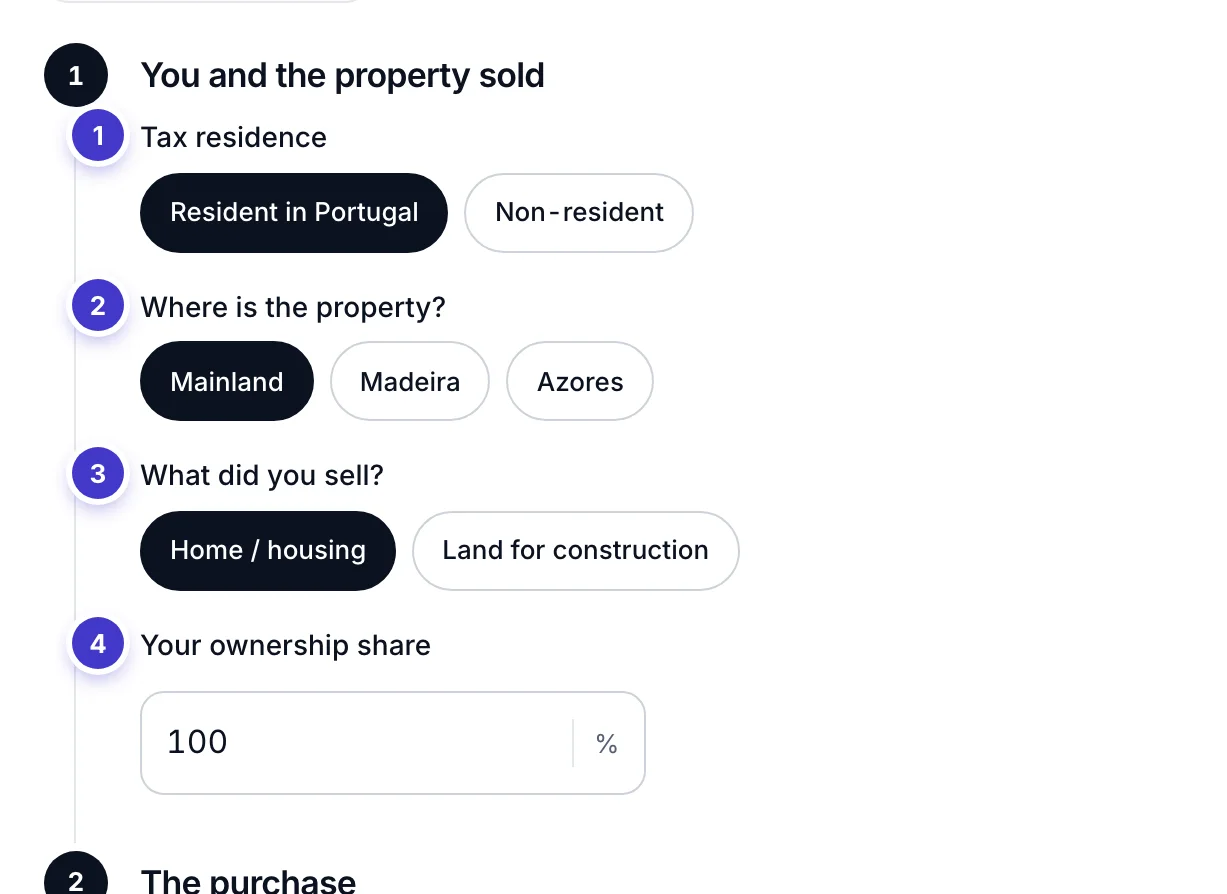
- Tax residence
Choose Resident in Portugal if you are tax resident in Portugal in the year of sale; otherwise Non-resident. Since 2023 both are taxed on 50% of the gain at progressive rates. The difference: a non-resident must enter their worldwide income in step 5, and the result is provisional.
- Where is the property?
Mainland, Madeira or Azores. This picks the IRS table. Madeira’s table is lower and the 2026 result is marked provisional. In the Azores the national rates apply with a 30% reduction (DLR 2/99/A); the result is marked provisional.
- What did you sell?
Home / housing for houses and flats; Land for construction for building plots. This matters mostly for purchases before 1989: homes bought before 1 January 1989 are not subject to capital-gains tax, but land for construction is.
- Your ownership share
Advanced mode only. The percentage of the property you own, for example 50 if you own half with someone else. Important: in the next steps always enter the figures for the whole property; the calculator applies your share. Simple mode assumes 100%.
Step 2 — The purchase
Here you enter when and for how much you bought, and what you spent on buying and on works. These amounts reduce the gain.
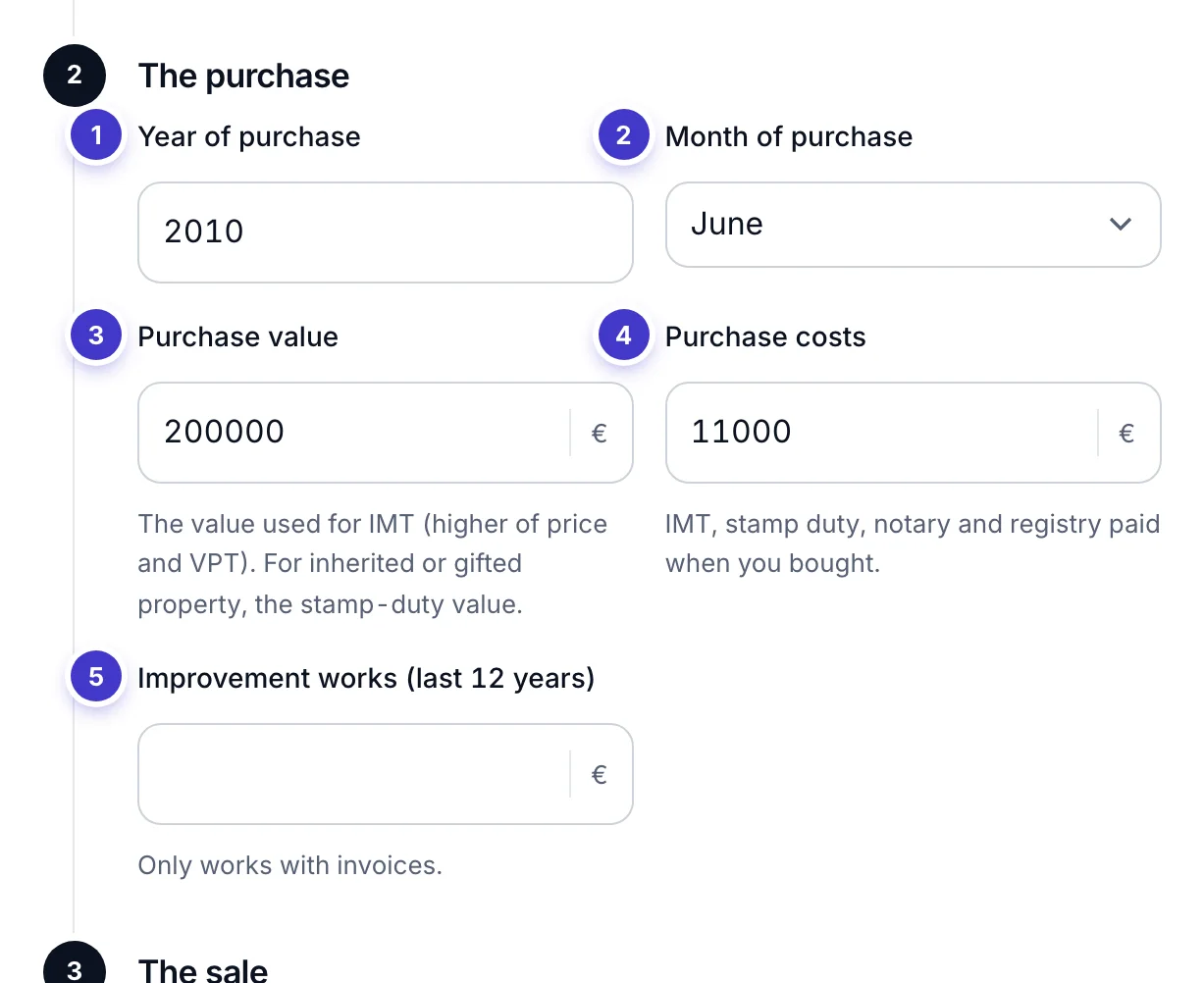
- Year of purchase
The year of the purchase deed, for example 2010. It sets the inflation coefficient: an official figure, published every year, that uplifts the purchase value for inflation. For 2026 sales, a 2010 purchase has a coefficient of 1.31 and a 2000 purchase 1.71. If you bought a home before 1989, there is no tax.
- Month of purchase
The month of the purchase deed. It is used to count how long you owned the property: the coefficient applies only if you owned it for more than 24 months. At 24 months or less, the purchase value is not adjusted.
- Purchase value
The value IMT was charged on when you bought: the higher of the price and the VPT at the time. It is on the deed and the IMT receipt. Example: 200000. If you inherited or were given the property, use the stamp-duty value. Enter the figure for the whole property.
- Purchase costs
What you paid to buy: IMT, stamp duty, notary and land registry. Example: 11000. These are accepted in practice, although the law does not list them expressly; the calculator shows a warning about this.
- Improvement works (last 12 years)
Works that added value to the property (for example, a new kitchen or an extension), done in the 12 years before the sale and with invoices. Leave blank if you have none. Cleaning and small repairs without invoices do not count.
Step 3 — The sale
Now the sale details. The year of sale is not a field: you choose it in the results with the “Sale in 2026” / “Sale in 2027” buttons.
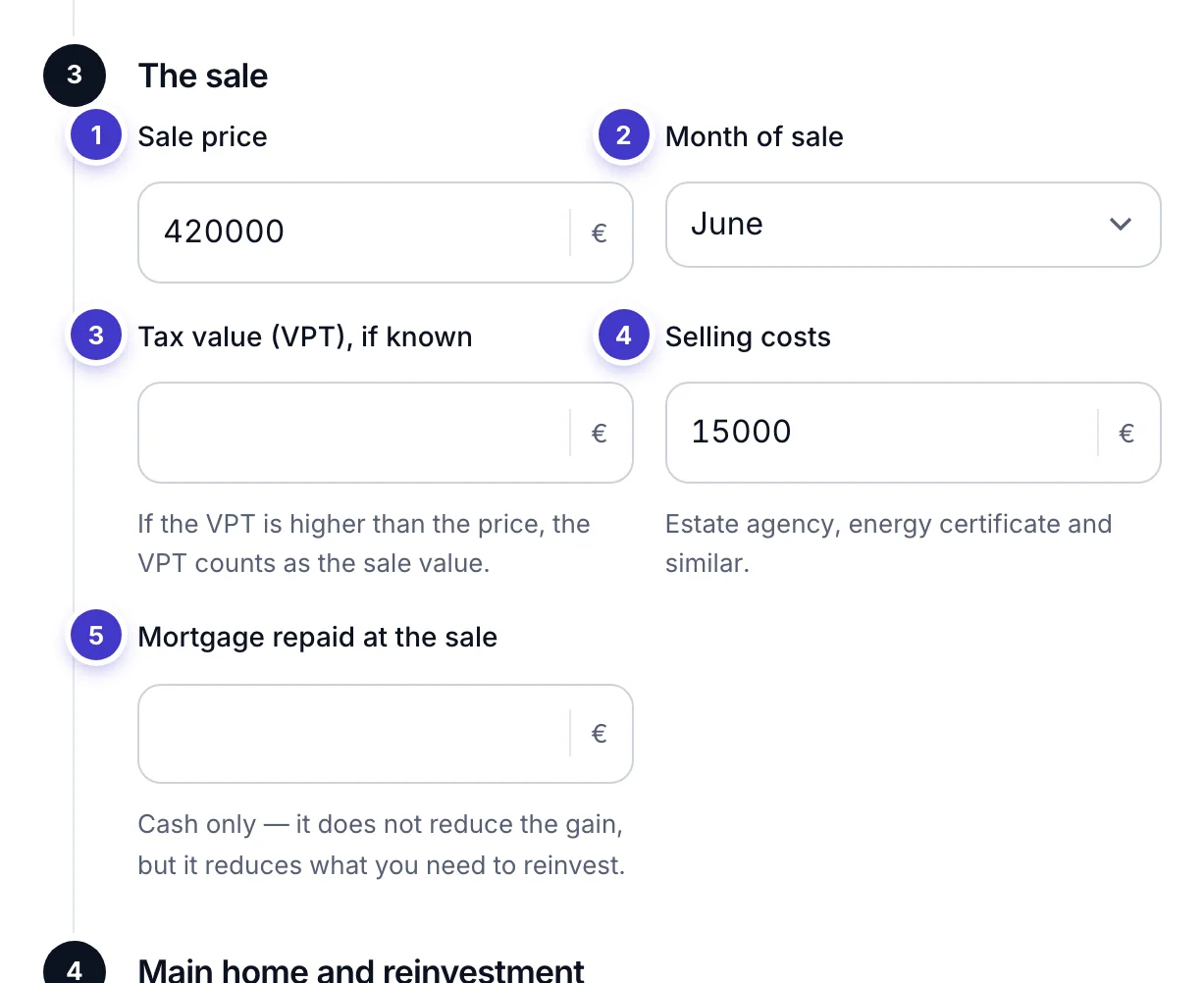
- Sale price
The price in the sale contract or deed, for the whole property. Example: 420000. Required.
- Month of sale
The month of the sale deed. Together with the purchase month and year, it decides whether you owned the property for more than 24 months. If you bought and sold in the same year, the purchase month must be the same as or earlier than the sale month.
- Tax value (VPT), if known
Advanced mode only. The VPT is on the property record (Portal das Finanças) and your IMI bill. If the VPT is higher than the price, the law uses the VPT as the sale value (the value for tax purposes). Leave blank if you don’t know it; the calculator then uses the price.
- Selling costs
What you paid to sell: estate agency commission, energy certificate and similar. Example: 15000.
- Mortgage repaid at the sale
If you still owed the bank money on this home, the amount paid off on the day of the sale. It does not reduce the gain: it is just cash going out. But it lowers the amount you need to reinvest in a new home (step 4) and lowers the “Cash you keep from the sale”.
Step 4 — Main home and reinvestment
Your own permanent home (in Portuguese HPP, habitação própria e permanente) is the home you normally live in, with your tax address there. If you sold your main home and buy another, the gain can be wholly or partly excluded from tax.
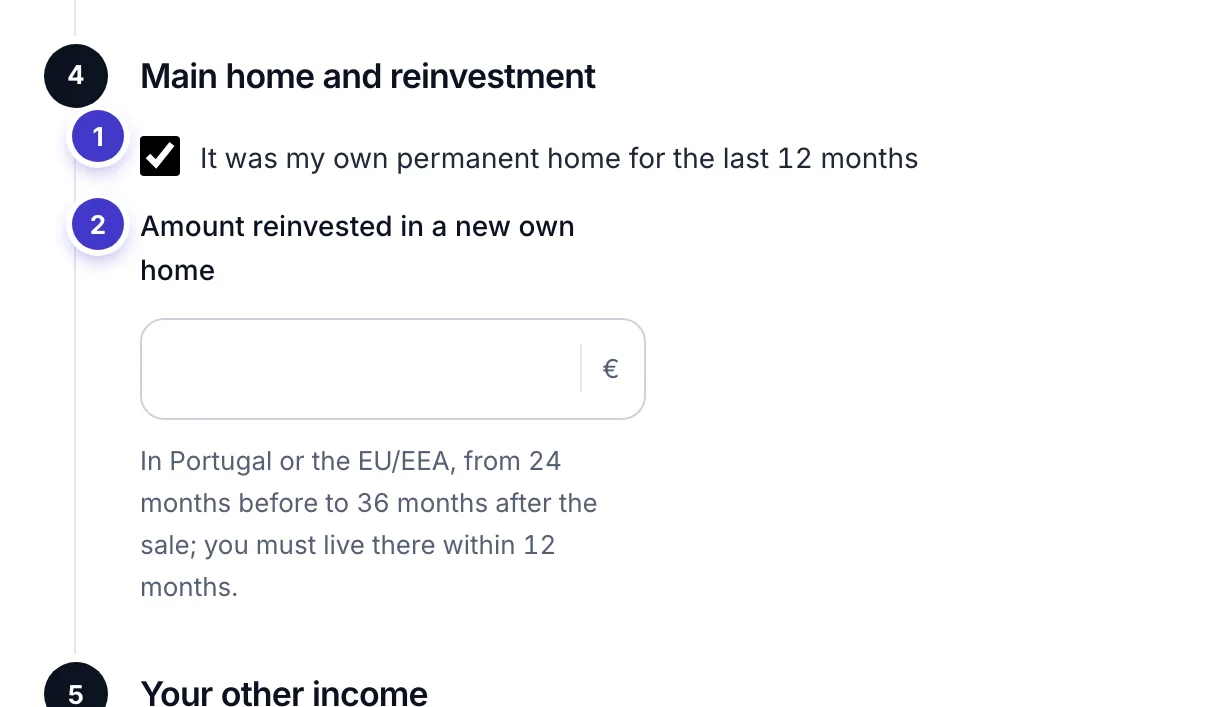
- It was my own permanent home for the last 12 months
Tick if the property you sold was your own permanent home for the 12 months before the sale. A holiday home or a let property does not count. Ticking it shows the next field.
- Amount reinvested in a new own home
Appears only when the box above is ticked. The amount you used (or will use) to buy, build or improve your new own permanent home, in Portugal or the EU/EEA, from 24 months before to 36 months after the sale. You must move in within 12 months and declare the reinvestment in your IRS return. To exclude the whole gain you must reinvest the sale value minus the mortgage repaid; if you reinvest only part, only that proportion of the gain is excluded.
Step 5 — Your other income
Half of the gain is added to your other income for the year and taxed at your marginal IRS rate. So the more you earn, the higher the rate on the gain.
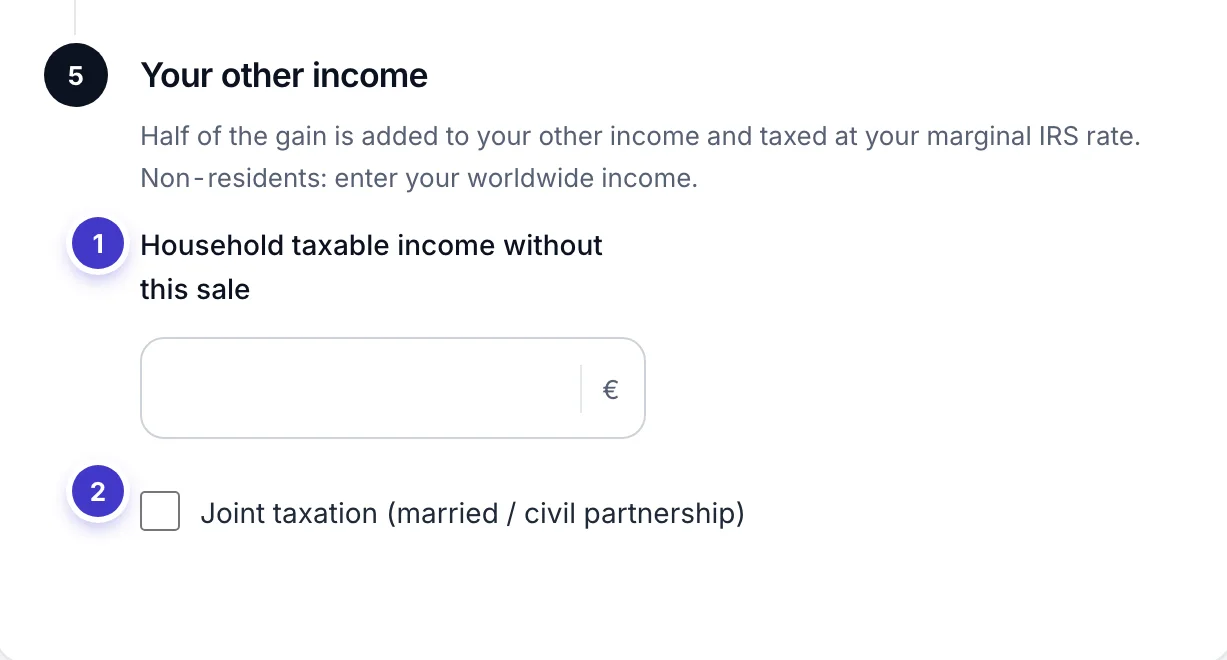
- Household taxable income without this sale
Enter your household’s taxable income for the year of sale (salaries, pensions, aggregated rent, after the standard deductions), excluding the gain. Last year’s IRS assessment notice shows this figure and is a good guide. Example: 30000. Left blank, it counts as 0. Non-residents: enter your worldwide income, because it sets the rate.
- Joint taxation (married / civil partnership)
Tick if you file IRS jointly with your spouse or partner. Then enter both partners’ taxable income in the field above; the calculator halves it, applies the table and doubles the result.
4. How to read the result
From the headline figure to the detail of every line.
Your estimate: the headline numbers
At the top of the card you see the inflation coefficient used (for example 1.31) and a status label (for example “✓ Enacted law”). Below are five numbers.
- Sale in 2026 / Sale in 2027
Choose the year of sale. For 2026 the published 2026 IRS table and coefficients are used. For 2027 the coefficients are not published yet (usually October–November), so the 2026 table is used as an assumption, and the 2027 IRS table comes from the Budget as voted, which is not yet law: the result is marked “⚠ Voted, not yet law”.
- IRS on the gain
The key number: how much extra IRS you pay because of this sale. It is your household’s IRS with the gain minus your IRS without it.
- Cash you keep from the sale
What ends up in your pocket: sale price (your share) minus selling costs, minus mortgage repaid, minus IRS. It is not the same as the gain: it includes the money you originally put into the property.
- Capital gain
The profit for tax purposes: sale value minus inflation-adjusted purchase value, minus costs and works. If it is negative, it is a loss and there is no tax.
- IRS as % of the gain
The IRS divided by the whole gain. Because only half is taxed, this percentage is well below your marginal rate.
- Your marginal rate
The rate of the highest IRS bracket you reach once the gain is included (for joint filers, on half of the total). Every extra euro of taxable gain is taxed at this rate.
How the taxable gain is built
This bar chart shows the calculation from top to bottom: the sale value, minus the purchase value corrected for inflation, minus costs and works, gives the capital gain; if you reinvest, the excluded part appears; finally, the taxable part (50%).
Try it: interactive chart
Move the sale-price slider. Notice that the gain rises and falls euro for euro with the price, while the corrected purchase value and the costs stay the same. The taxable part is always half the gain, and the IRS grows faster as the gain pushes you into higher brackets. Lower the price until the gain turns negative and the tax disappears.
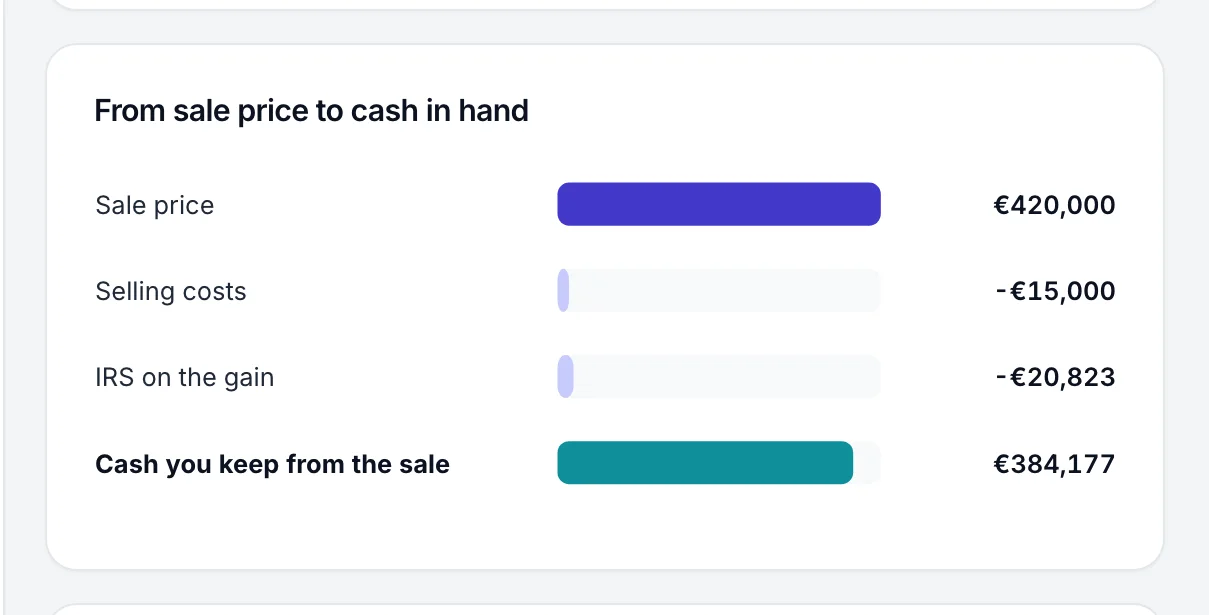
From sale price to cash in hand
This chart shows real money: it starts from the sale price, takes off the selling costs, the mortgage repaid (if any) and the IRS, and ends at “Cash you keep from the sale”. Use it for planning, for example how much deposit you can put down on your next home.
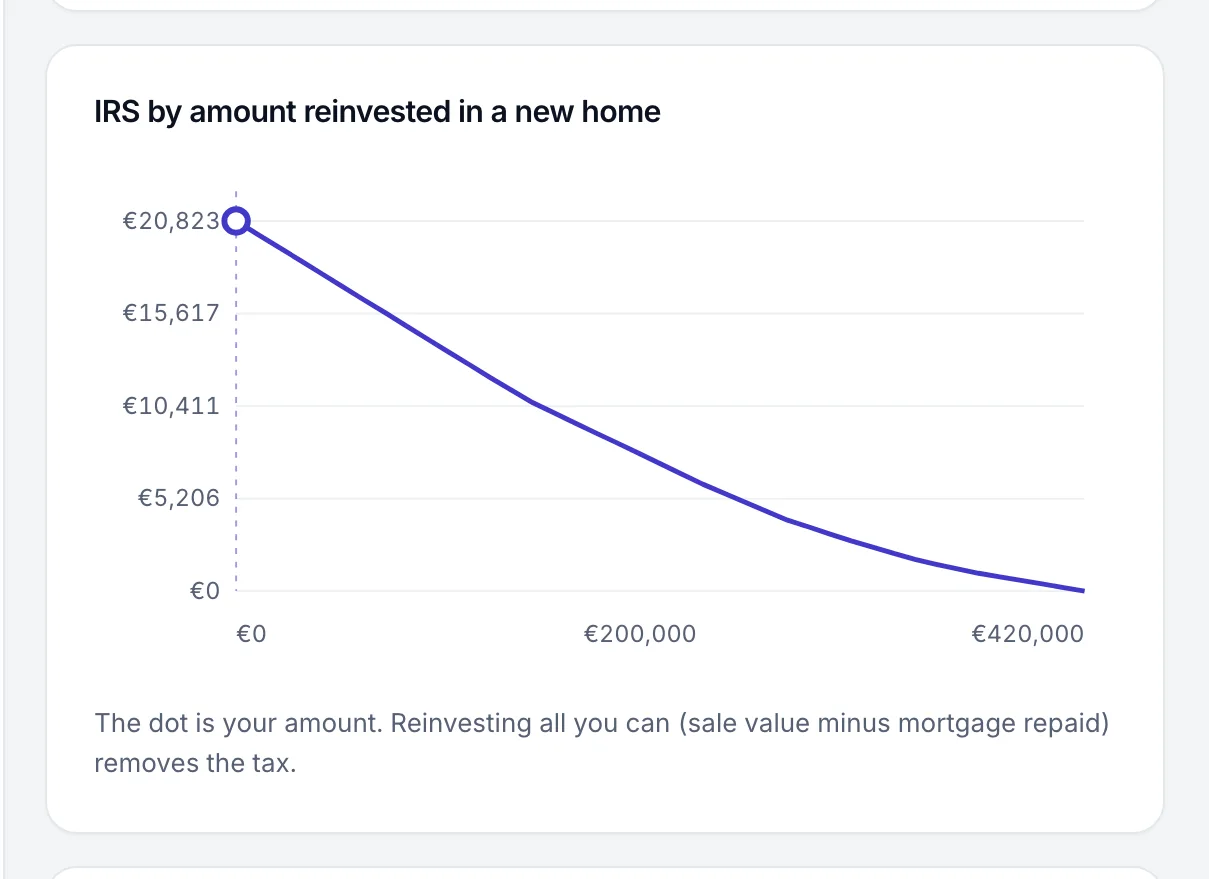
IRS by amount reinvested in a new home
Appears only if you ticked the main-home box in step 4 and there is a taxable gain. The line shows the IRS for every amount reinvested, from zero up to the maximum (sale value minus mortgage repaid). The dot is your amount. The more you reinvest, the less IRS; reinvesting all you can removes the tax.
The table, line by line
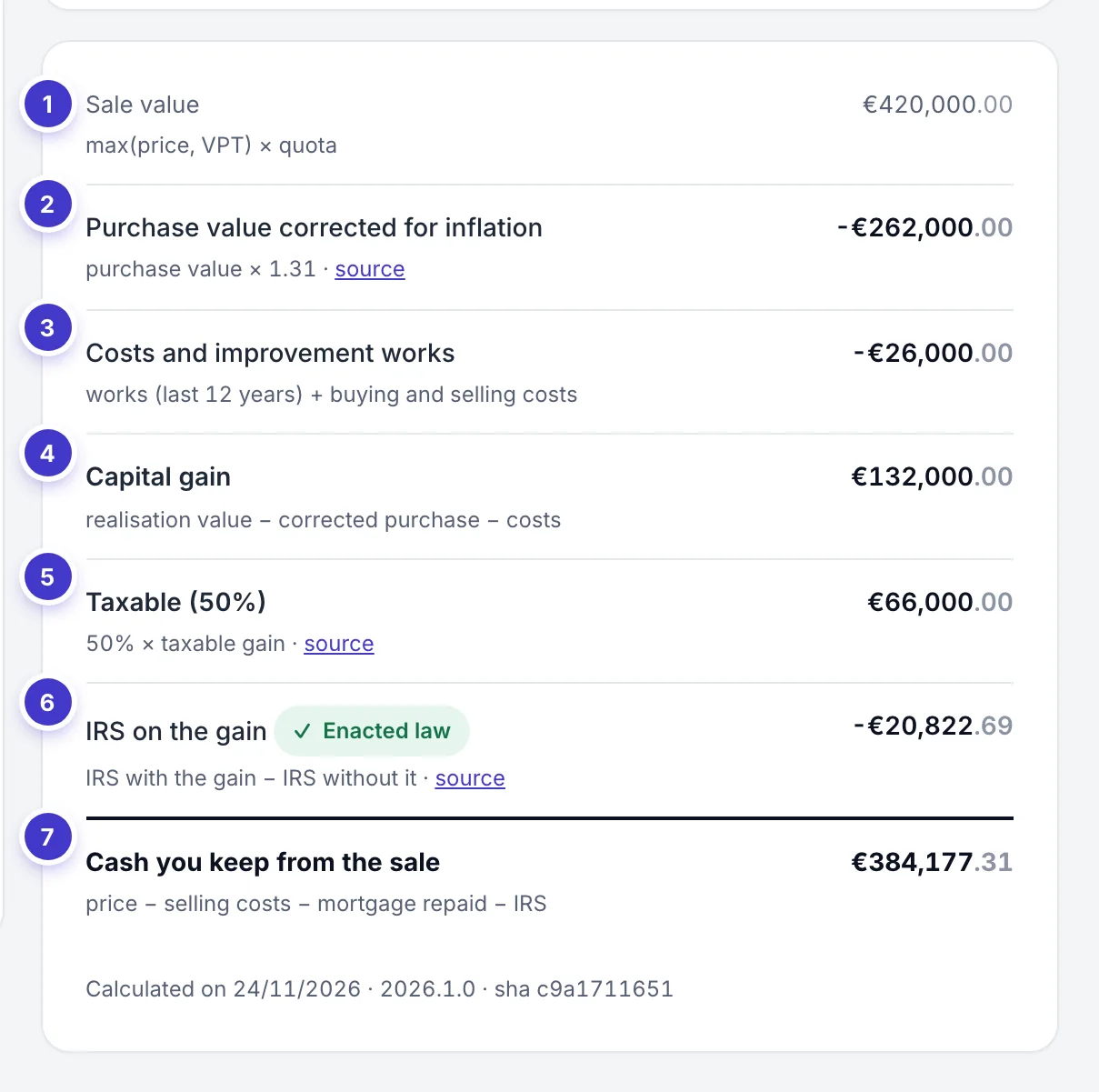
The table repeats the calculation with the formula for each line and, on several lines, a “source” link to the law. With reinvestment, a mortgage repaid or a pre-1989 purchase, extra lines appear: “Excluded by reinvestment”, “Mortgage repaid at the sale” or “Not taxable (bought before 1989)”.
- Sale value
The higher of price and VPT, multiplied by your share.
- Purchase value corrected for inflation
The purchase value multiplied by the coefficient for the purchase year (for example €200,000 × 1.31 = €262,000). If you owned the property for 24 months or less, there is no correction.
- Costs and improvement works
Works from the last 12 years plus buying and selling costs.
- Capital gain
Sale value minus corrected purchase value minus costs and works.
- Taxable (50%)
Half of the gain left after any reinvestment exclusion. This is the amount added to your other income.
- IRS on the gain
IRS with the gain minus IRS without it, with its status label. It includes the solidarity surcharge when your income reaches it.
- Cash you keep from the sale
Price minus selling costs minus mortgage repaid minus IRS.
Warnings
Below the table, warnings appear depending on your figures. Always read them. The most common:
- Purchase costs
Purchase costs (IMT, stamp duty) are accepted in practice, but the law does not list them expressly.
- Simplified IRS
No tax credits or minimum-subsistence rule: your actual IRS may differ a little.
- Reinvestment conditions
Shown when you enter a reinvestment: it repeats the deadlines and that you must declare it in your IRS return.
- Non-residents
The rate is set by reference to worldwide income — the result is provisional.
- VPT above the price
The VPT was used as the sale value.
- 2027 coefficients
For a 2027 sale, the 2026 coefficient table is used as an assumption.
- Loss / before 1989
No tax: there was a loss, or the home was bought before 1 January 1989.
Final notes and buttons
At the end there are two notes: what the calculator does not cover, and a reminder that this is an educational estimate, not advice. Then four buttons: Save to my account, Print / PDF (handy to take to your adviser), Download CSV (the table lines as a spreadsheet) and Methodology (how the calculation works and its sources).
The colour labels
Every figure carries a label saying how certain it is. Always read them.
The IRS was calculated with published rules in force: a 2026 sale of a mainland property.
There is some uncertainty. It appears, for example, for a 2026 sale of property in Madeira: part of the regional IRS table was derived and is not yet confirmed.
The calculator cannot estimate this tax (for example, when a year’s table is not available yet). It does not mean you pay nothing: ask an adviser to calculate it.
A 2027 sale: it uses the IRS table from the 2027 State Budget as voted, not yet published as law. It may change.
5. Ana sells the flat she bought in 2010
Ana, a Lisbon resident, bought a flat in June 2010 and sells it in June 2026. It was not her own permanent home (it was let), so there is no reinvestment. Her taxable income is €30,000 and she files IRS on her own.
| What you type | Value |
|---|---|
| Tax residence | Resident in Portugal |
| Where is the property? | Mainland |
| What did you sell? | Home / housing |
| Your ownership share | 100% |
| Year of purchase / Month of purchase | 2010 / June |
| Purchase value | €200,000 |
| Purchase costs | €11,000 |
| Improvement works (last 12 years) | (blank) |
| Sale price / Month of sale | €420,000 / June |
| Tax value (VPT), if known | (blank) |
| Selling costs | €15,000 |
| Mortgage repaid at the sale | (blank) |
| It was my own permanent home for the last 12 months | Not ticked |
| Household taxable income without this sale | €30,000 |
| Joint taxation (married / civil partnership) | No |
| Year of sale (button in the results) | Sale in 2026 |
| What you see | Value |
|---|---|
| Inflation coefficient | 1.31 · ✓ Enacted law |
| Sale value | €420,000.00 |
| Purchase value corrected for inflation | -€262,000.00 |
| Costs and improvement works | -€26,000.00 |
| Capital gain | €132,000.00 |
| Taxable (50%) | €66,000.00 |
| IRS on the gain | €28,793.27 |
| Cash you keep from the sale | €376,206.73 |
| IRS as % of the gain | 21.8% |
| Your marginal rate | 48% |
6. Common mistakes (and how to avoid them)
Entering only your share of the figures
Always enter the figures for the whole property and set your share in Advanced mode. The calculator applies the percentage.
Treating the mortgage as a cost
The mortgage repaid at the sale does not reduce the gain. Put it in “Mortgage repaid at the sale”: it only reduces the cash you keep and the amount to reinvest.
Including works without invoices or older than 12 years
Only improvement works with invoices from the last 12 years count. Gather your invoices before you start.
Ignoring the VPT
If the VPT is higher than the sale price, the VPT counts. Use Advanced mode and check the VPT on your property record.
Using your gross salary as income
The field asks for taxable income, which is lower. Use your IRS assessment notice as a guide.
Ticking “own permanent home” for a holiday or let property
The reinvestment exclusion applies only if the property sold was your own permanent home for the 12 months before the sale.
7. Frequently asked questions
I sold for less than I paid. Do I owe anything?
I bought my home before 1989. Do I have to pay?
I am a non-resident. What income do I enter in step 5?
Why is “Cash you keep from the sale” so much bigger than the gain?
When do I pay this IRS?
I don’t know yet whether I’ll sell in 2026 or 2027. Which do I pick?
What next?
Print or save the result as a PDF and take it to a lawyer or tax adviser, together with your purchase deed, IMT receipt, invoices for works and costs, the sale contract and the property record.
If you are reinvesting in a new main home, keep the proof of the new purchase and remember the deadlines: from 24 months before to 36 months after the sale, and moving in within 12 months. Declare the reinvestment in your IRS return.
Non-residents: also speak to an adviser in your own country, which may tax the same gain.
Remember: this result is an educational estimate, not tax advice.
Educational estimate — not tax, legal or financial advice. Uncovered World Unip. Lda is not a tax adviser or financial company: always consult a qualified lawyer or tax adviser.
Run the numbers for your case
Free, private and with every line sourced. Always confirm with a qualified Portuguese tax adviser or lawyer.