Step-by-step guide · 12 min
For anyone who runs (or is thinking of running) an apartment, house or hostel as a holiday let in Portugal and wants to know what is left at the end of the year. In about 12 minutes you get an estimate of VAT, IRS, social security, platform fees and profit after tax.
- For beginners: every term explained
- Numbered screenshots of the calculator
- Interactive chart and a PDF to download

1. What this calculator does
Alojamento local (AL) is short-term letting to tourists, for example through Airbnb or Booking. When the owner runs it personally, the tax office treats it as a small business: IRS Category B (business income) under the so-called simplified regime. In this regime you do not deduct your actual costs: only a fixed share of revenue is taxed — 35% for an apartment or house, 50% in a containment area and 15% for a hostel.
The calculator starts from your bookings (price per night, occupancy, cleaning fees) and works out, step by step: what guests pay, the VAT (value added tax) you must pass to the State, platform commissions, taxable income, IRS (Portuguese income tax), social security (hostels only) and finally your profit after tax per year and per month. It works for Portuguese tax residents and non-residents, and lets you compare 2026 law with the 2027 Budget as voted.
Licensing first: an AL must be registered with the council. Councils may restrict or suspend new registrations and your condominium can object. The calculator does not check any of this — make sure your property can be an AL before anything else.
Not covered: organised accounts, the option to be taxed as rental income (Category F), companies, recovering VAT on costs, IRS tax credits and the minimum-subsistence rule, taxes in other countries, and the tourist tax (collected from guests and passed to the council — it is not your income or cost). The result is an educational estimate, not tax advice: always check with a qualified tax adviser or lawyer.
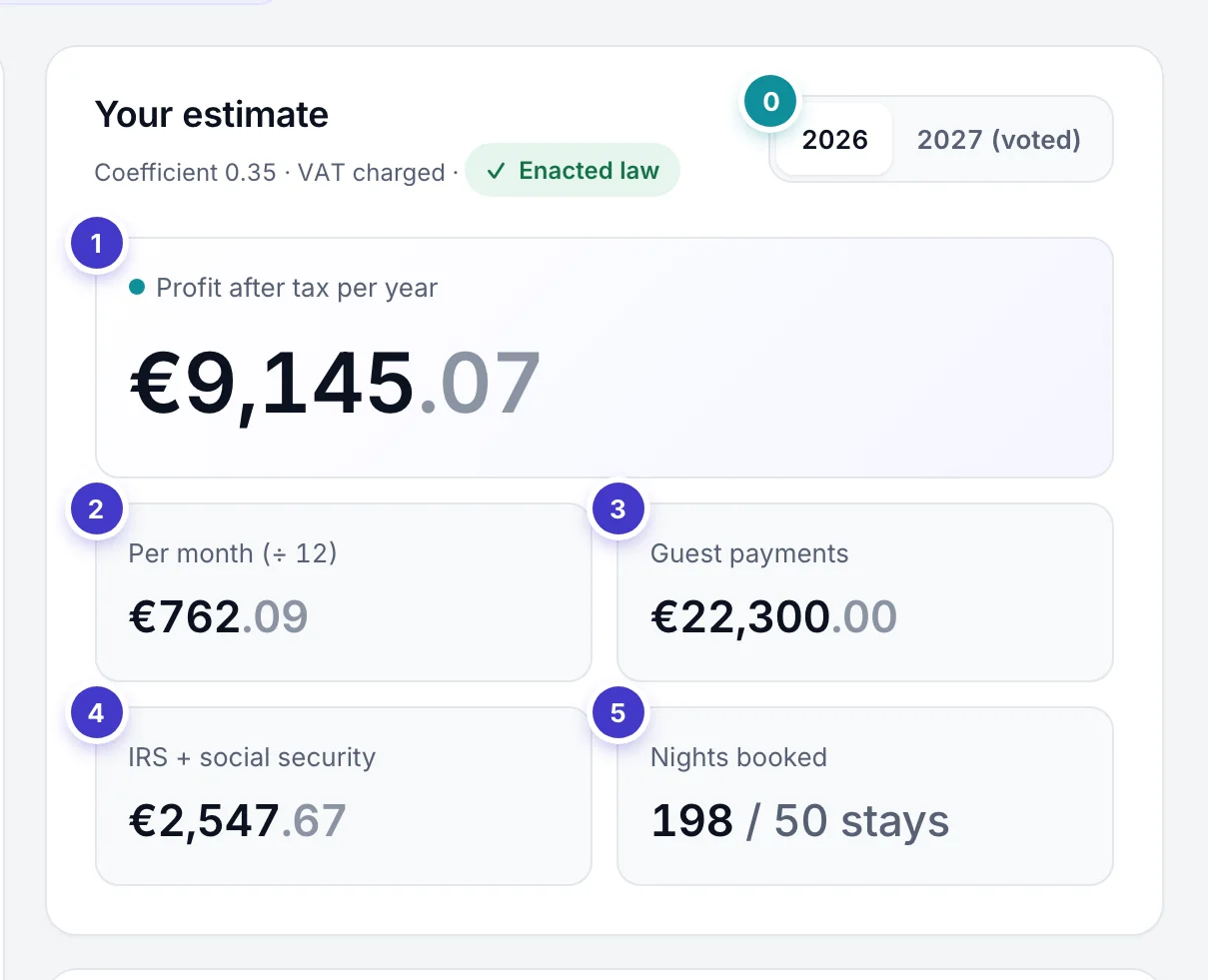
What you will see at the end: the main result, explained in section 4.
2. Before you start: what you need
Have these at hand. If one is missing, the calculator tells you what is unknown — it never treats it as zero.
Confirmation the property can be an AL
Your council’s holiday-letting regulation (on the council website) says whether your street is in a containment area or whether new registrations are suspended. Ask your condominium too.
Average nightly price and cleaning fee
What guests pay, from your listing or the platform’s payout reports. If you have not started yet, look at similar listings nearby.
Occupancy and average stay
From last year’s platform calendars and reports. If you are starting out, use a cautious guess (for example 50–60%).
Platform commission percentage
In the Airbnb, Booking, etc. terms, or on the commission invoices they send you.
Yearly costs with invoices
Invoices for cleaning, laundry, water, electricity, internet, maintenance, insurance, condominium, management and IMI. Many show up on Portal das Finanças (e-Fatura) if you gave your tax number (NIF).
Mortgage interest
On your bank’s annual statement.
Tax value (VPT)
On the property record (caderneta predial) or your IMI bill, both on Portal das Finanças → Imóveis.
Your other income
Residents: the “rendimento coletável” (taxable income) on your latest IRS assessment (nota de liquidação) on Portal das Finanças. Non-residents living in the EU/EEA who want to compare the progressive-rate option: your total worldwide taxable income.
3. Filling it in, step by step
The numbers on the pictures match the numbers in the explanations.
At the top of the form there are three buttons. 1 · Simple shows only the essentials. 2 · Advanced adds Tax value (VPT) and VAT status to step 3. In Simple mode these two still count: the last VPT entered is used (€150,000 to start with) and VAT is set to “Automatic”. This guide describes Advanced mode.
3 · Reset puts every value back to the starting figures (and returns to Simple mode). What you type is remembered in this browser, so you can close the page and come back later. Results update as you type — there is no “calculate” button.

Step 1 — Your holiday let
Tell us where the property is, what kind of AL it is and where you are tax resident. These four choices change the rates used everywhere else.
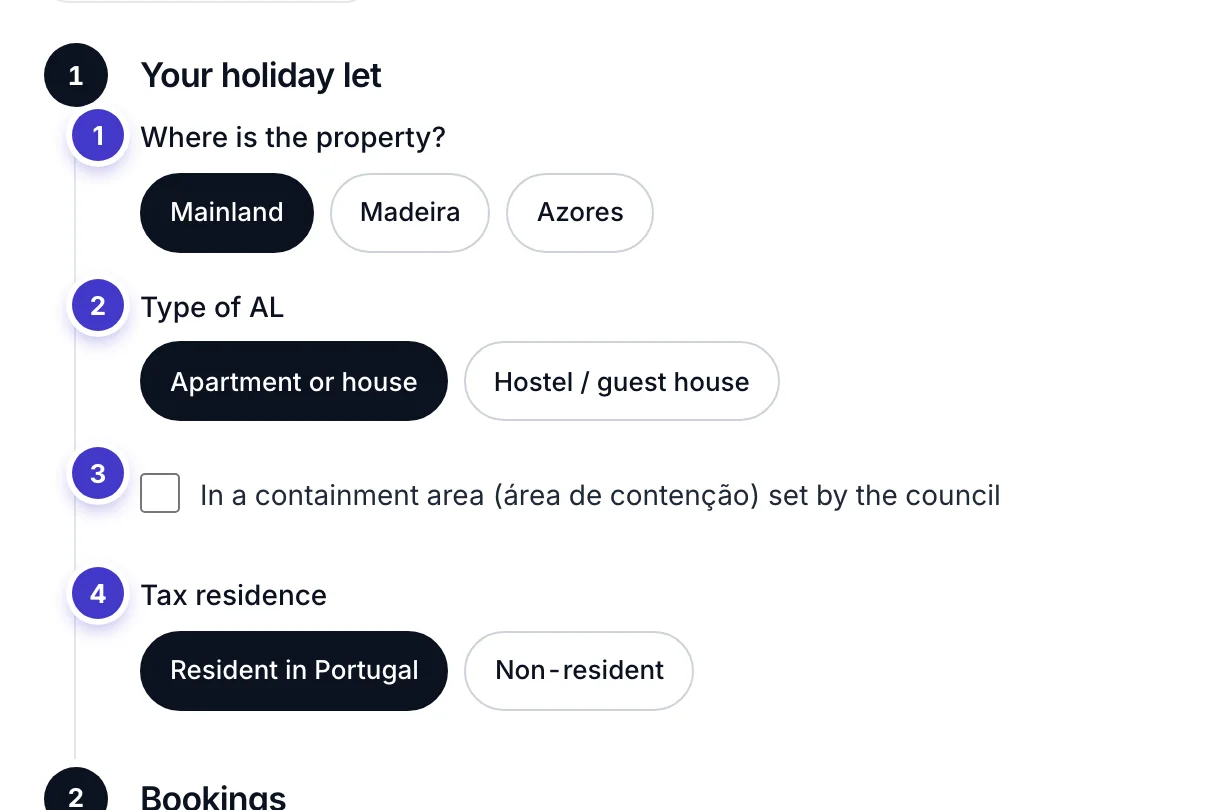
- Where is the property?
Choose Mainland, Madeira or Azores. This changes the VAT rate (6% on the mainland, 4% in the islands) and the IRS table. In the autonomous regions IRS uses the national rates reduced by 30% and is marked provisional.
- Type of AL
Apartment or house (the usual case: 35% of revenue is taxed) or Hostel / guest house (15% is taxed, but social security is due). If you choose hostel, an extra step called “Social security” appears with two boxes: “First 12 months of activity” (no contributions yet) and “I am also employed (other income as an employee)” (contributions only on relevant income above 4 × IAS per month).
- In a containment area (área de contenção) set by the council
Tick only if the council’s regulation puts your street in a containment area (a zone where the council limits new holiday lets). Then 50% of revenue is taxed instead of 35%. Only shown for an apartment or house. If unsure, leave it unticked and ask the council.
- Tax residence
Resident in Portugal if Portugal is your tax home. Non-resident if you live in another country. This changes IRS: residents add the AL to their other income; non-residents pay a flat 25% (see step 4).
Step 2 — Bookings
These numbers become your yearly revenue: nights open × occupancy = nights booked; nights booked ÷ average stay = number of stays (each with one cleaning fee).
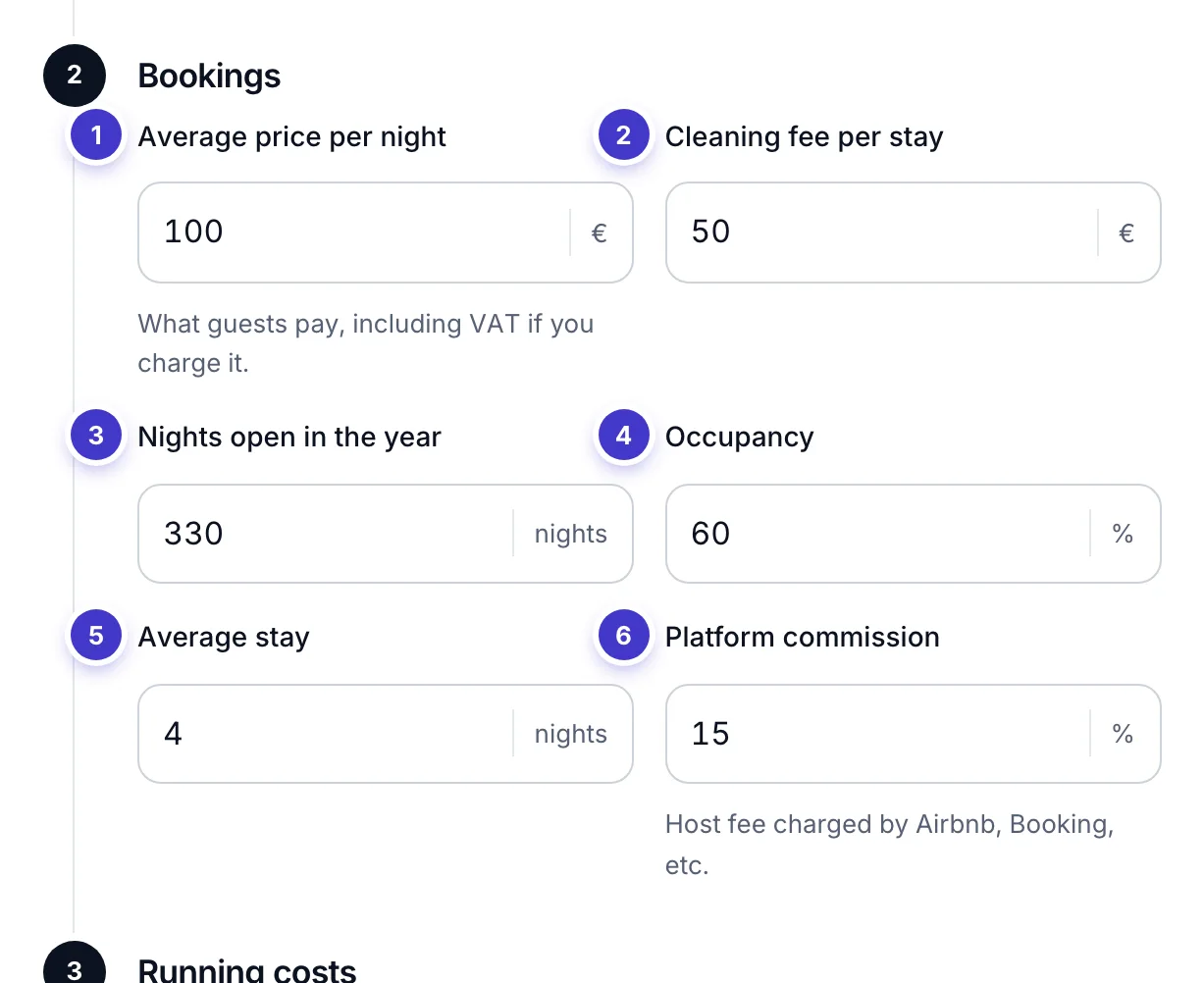
- Average price per night
What guests pay per night, on average over the year, including VAT if you charge it. Example: €100. Do not take off the platform commission here — that comes later.
- Cleaning fee per stay
What you charge guests per stay for cleaning. Example: €50. If you charge nothing, type 0. (What you pay your cleaner is a cost and goes in step 3.)
- Nights open in the year
How many nights the property is open for bookings (0 to 366). Example: 330, if you close for about a month for personal use or repairs.
- Occupancy
The share of open nights actually booked (0–100%). Example: 60% of 330 nights = 198 nights booked. This is the number that moves the result most — use the “Profit by occupancy” chart to see its effect.
- Average stay
How many nights each booking lasts on average (at least 1). Example: 4. It is used to count stays and so cleaning fees: 198 nights ÷ 4 = 50 stays (rounded up).
- Platform commission
The host fee charged by Airbnb, Booking, etc., as a percentage of what the guest pays (0–50%). Example: 15%. If you use several platforms, use a rough average.
Step 3 — Running costs
Under the simplified regime costs are not deducted from tax — but they matter twice: they reduce your profit, and they count for the “15% expense test”. What that is: for an apartment or house outside a containment area, 15% of revenue (excluding VAT) must be backed by the €4,104 specific deduction, your invoiced costs, platform fees and 4% of the VPT. If they fall short, the difference is added to taxable income.
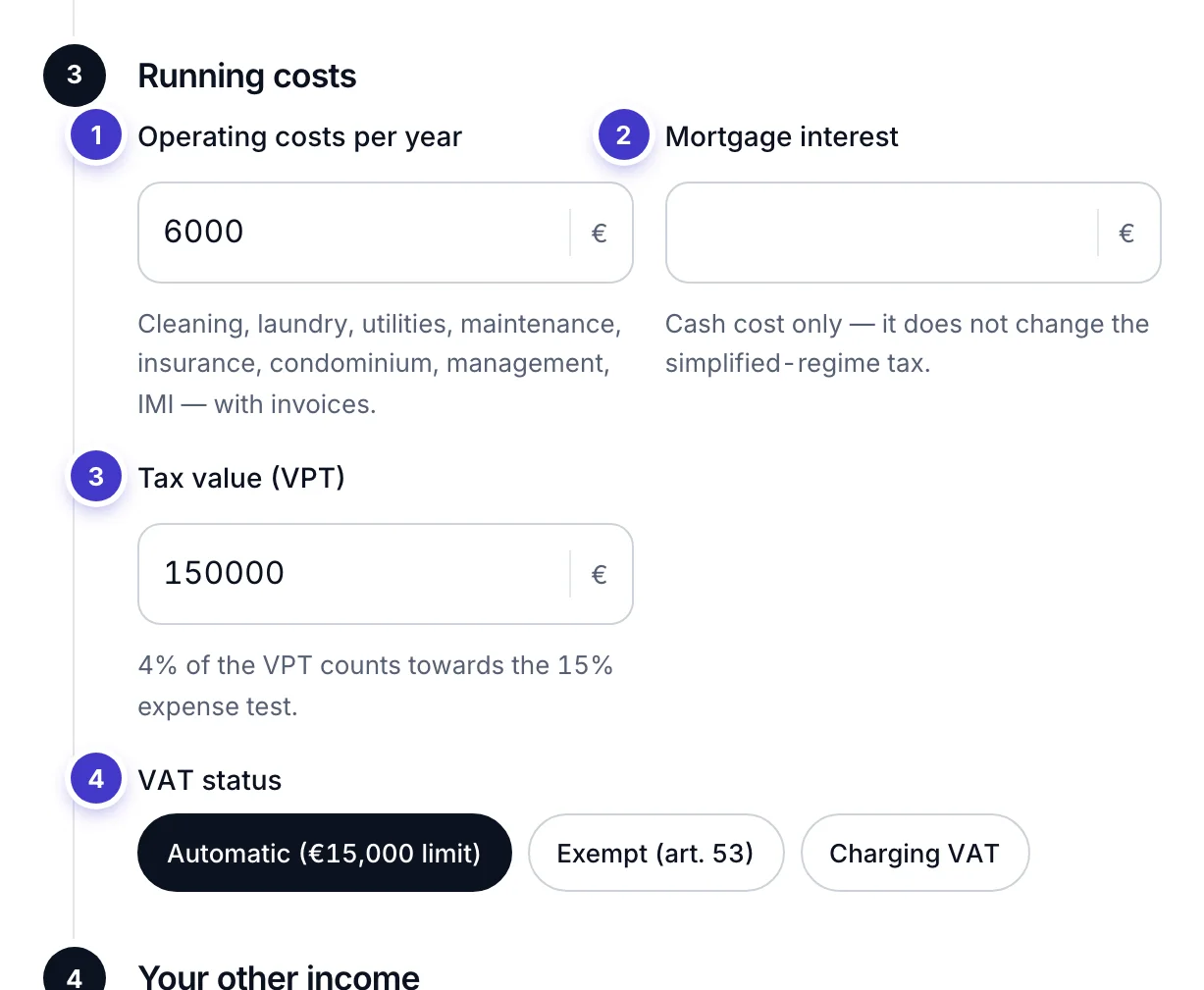
- Operating costs per year
Everything you spend to keep the AL running, with invoices: cleaning, laundry, utilities (water, electricity, gas, internet), maintenance, insurance, condominium, management and IMI. Example: €6,000. Do not include the platform commission (already entered) or mortgage interest.
- Mortgage interest
Interest paid to the bank in the year on the loan for this property. It only reduces your profit (it is cash going out) — it does not change the tax under the simplified regime. Leave it empty if you have no mortgage.
- Tax value (VPT)
Advanced mode only. The property’s value for tax purposes, on the caderneta predial or your IMI bill. Example: €150,000. It is used only in the 15% test: 4% of it counts (€6,000 in the example).
- VAT status
Advanced mode only. Automatic (€15,000 limit): the calculator treats you as exempt if guest payments stay at or below €15,000 a year, assuming last year was similar. Exempt (art. 53): you are in the small-business VAT exemption. Charging VAT: you already charge VAT (6% on the mainland, 4% in the islands, included in the price). If you are exempt, note that you must self-assess VAT on platform commissions (23% on the mainland) and cannot recover it.
Step 4 — Your other income
For residents, AL income is added to your other income and taxed at progressive IRS rates (the more you earn, the higher the rate). So the calculator needs to know what you already earn. For a hostel this step is numbered 5.
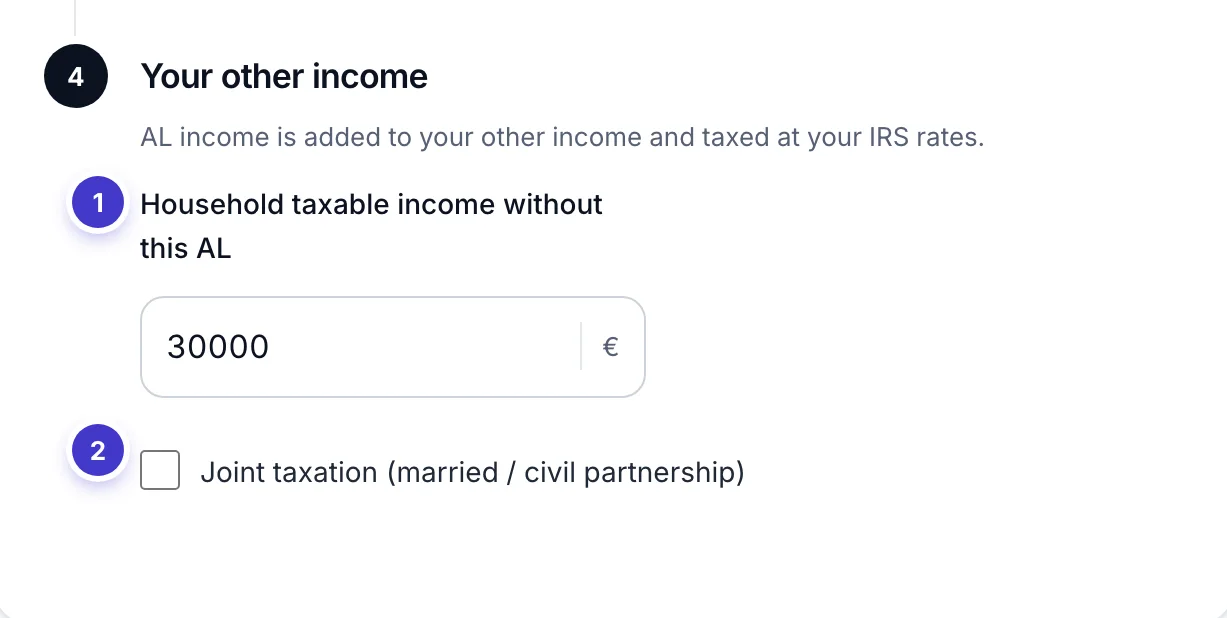
- Household taxable income without this AL
Your “rendimento coletável” (income after the standard deductions) without the AL. It is on your latest IRS assessment. Example: €30,000. Shown only for residents. For non-residents this field disappears and a box appears instead: “I live in another EU/EEA country and want to compare the progressive-rate option (CIRS art. 72.º n.º 15)”. If you tick it, enter “Your worldwide taxable income, excluding this AL” — all your income, including income earned outside Portugal, which sets the rate under that option.
- Joint taxation (married / civil partnership)
Tick if you file IRS jointly with your spouse or partner; then enter the couple’s taxable income above. For non-residents it only appears after ticking the EU/EEA option.
4. How to read the result
From the headline figure to the detail of every line.
Your estimate: the headline numbers
The first card sums everything up. Under the title a line shows the coefficient used (0.35, 0.50 or 0.15), whether VAT applies (“VAT charged” or “VAT-exempt”) and a label saying how firm the IRS rule is.
- 2026 / 2027 (voted)
“2026” uses current law. “2027 (voted)” uses the 2027 Budget as voted — not yet law, and the label changes to “Voted, not yet law”. For 2027 the social-security IAS and regional VAT rates are not yet published, so 2026 values are used.
- Profit after tax per year
The key number: what you keep after VAT, commissions, costs, interest, IRS and social security. If it is negative, you lose money.
- Per month (÷ 12)
The same profit divided by 12 — handy for comparing with a monthly rent from a long-term tenant.
- Guest payments
Everything guests pay in the year: nights booked × price + stays × cleaning fee. Includes VAT if you charge it.
- IRS + social security
The taxes on your AL income. For an apartment or house social security is zero. If it shows “Unknown”, that does not mean zero: a tax table is missing for that region or year.
- Nights booked
How many nights are booked and how many stays that makes (for example “198 / 50 stays”). Check it matches reality.
Non-residents only: the “IRS for non-residents” card
If you chose “Non-resident”, an extra card appears right after the estimate. It is not in this guide’s pictures, which use a resident.
- Flat rate 25%
25% × your simplified-regime taxable income (CIRS art. 72.º n.º 6 b)). Your other income does not count. The base is our reading of the law — confirm with an adviser. Madeira/Azores regional reductions are not applied to non-residents (not confirmed).
- EU/EEA option: progressive rates
Shown only if you ticked the option in step 4. It works out IRS at progressive rates (national table), with the rate set by your worldwide income. The highlighted line is the one used: the calculator always picks the lower one, and the sentence below says which. You choose the option in your IRS return.
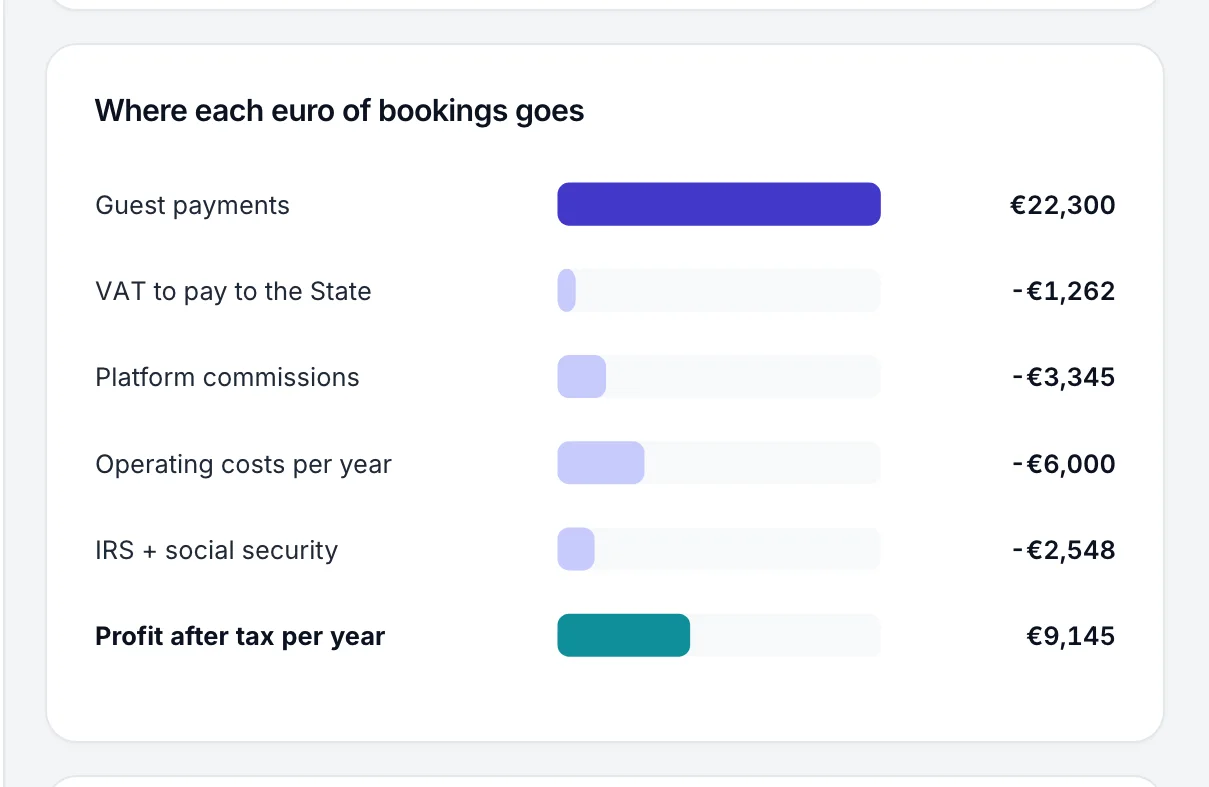
Where each euro of bookings goes
A bar chart that starts from guest payments and takes away, in order: VAT to pay to the State (if any), platform commissions (including self-assessed VAT if you are exempt), operating costs (with interest), IRS + social security and, last, your profit. It shows at a glance which slice is biggest.
Profit by occupancy
This chart reruns the calculation for occupancy from 10% to 100% and plots profit after tax for each. The dot is your occupancy. VAT applies once guest payments pass €15,000 a year, so the curve can step down at that point.
Try it: interactive chart
Move the occupancy slider and watch revenue, taxes and profit change. With the starting figures, profit is about €1,742.57 a year at 30% occupancy, €9,145.07 at 60% and €16,717.60 at 90%. Look around 40%: that is where guest payments pass €15,000 and VAT starts, which eats part of the gain from extra bookings.
The calculation line by line
The table shows each step, with the formula in small print and, where available, a “source” link to the law. Some lines only appear in certain cases: “VAT on commissions (self-assessed)” if you are VAT-exempt, “Social security” for a hostel, “Mortgage interest” if you entered it. The IRS line carries a status label.
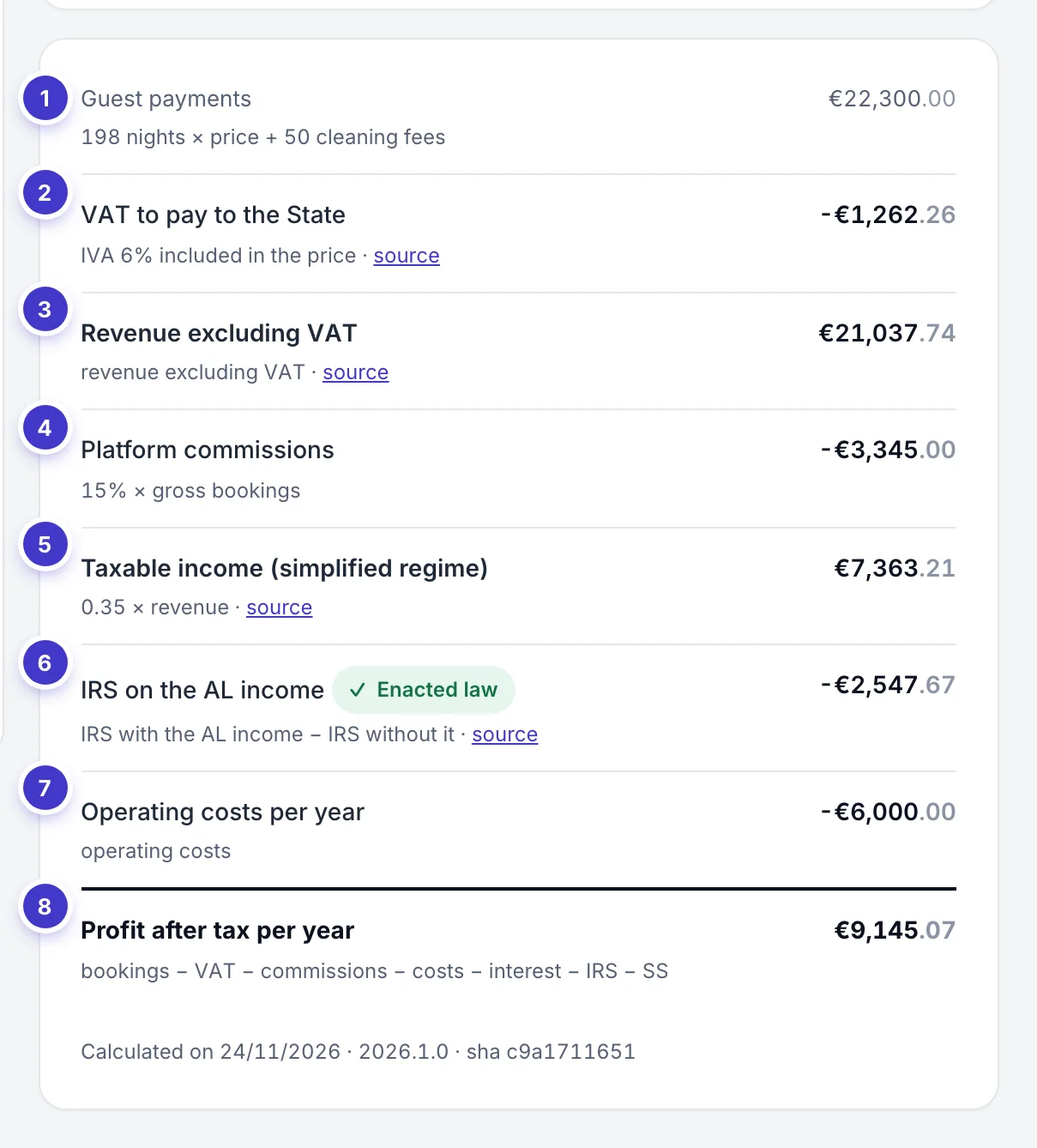
- Guest payments
Nights × price + cleaning fees — the starting point.
- VAT to pay to the State
Only if you charge VAT. VAT is already inside the price (6% on the mainland, 4% in the islands), so it is taken out and passed to the State.
- Revenue excluding VAT
Your real revenue. The IRS coefficient applies to this. If you are exempt, it equals guest payments.
- Platform commissions
Commission percentage × guest payments.
- Taxable income (simplified regime)
Coefficient × revenue excluding VAT (0.35, 0.50 or 0.15). If you fail the 15% test, the formula adds “+ 15% expense-test addition”.
- IRS on the AL income
Residents: IRS with the AL minus IRS without it — the extra IRS the AL costs you. Non-residents: 25% of taxable income (or the EU/EEA option if lower).
- Operating costs per year
Your costs as entered. They come off profit, not off tax.
- Profit after tax per year
Bookings − VAT − commissions − costs − interest − IRS − social security. The same as the big number in the first card.
Warnings and notes below the table
Always read the list of warnings: it changes with your figures and says what was assumed. Below it are an orange box and two information boxes.
- List of warnings
For example: that VAT status assumes a similar previous year; that the VAT exemption ends on 1 January next year above €15,000, or immediately above €18,750; that exempt hosts must self-assess VAT on commissions; that an apartment or house as your only self-employed activity pays no social security; that above €200,000 of revenue the simplified regime may no longer apply.
- ⚠ Licensing
A reminder to check first that the property can be registered as an AL. We do not verify licensing.
- ⓘ Not covered
What the calculator does not work out: organised accounts, the Category F option, companies, VAT recovery on costs and the tourist tax.
- ⓘ Educational estimate
Not tax advice and not an assessment by the Tax Authority (AT). Below are the “Save to my account”, “Print / PDF” and “Methodology” buttons.
The colour labels
Every figure carries a label saying how certain it is. Always read them.
IRS was worked out with the 2026 table in force, for a resident on the mainland.
The rule is applied, but something is still to be confirmed: Madeira residents, all non-residents (the 25% base is our reading of the law) and the social-security line for hostels.
IRS could not be worked out — for example when a year’s table is not available yet — because the table is not available. The tax exists; profit also shows as unknown.
Shown with the “2027 (voted)” scenario: it uses the 2027 Budget as voted, which may still change.
5. Example: a one-bedroom holiday let on the mainland
Marta lives in Portugal, is single and has taxable income of €30,000. She runs an apartment on the mainland herself, outside any containment area, through a booking platform. These are the calculator’s starting values.
| What you type | Value |
|---|---|
| Where is the property? | Mainland |
| Type of AL | Apartment or house |
| In a containment area (área de contenção) set by the council | No |
| Tax residence | Resident in Portugal |
| Average price per night | €100 |
| Cleaning fee per stay | €50 |
| Nights open in the year | 330 |
| Occupancy | 60% |
| Average stay | 4 nights |
| Platform commission | 15% |
| Operating costs per year | €6,000 |
| Mortgage interest | (empty) |
| Tax value (VPT) | €150,000 |
| VAT status | Automatic (€15,000 limit) |
| Household taxable income without this AL | €30,000 |
| Joint taxation (married / civil partnership) | No |
| Year | 2026 |
| What you see | Value |
|---|---|
| Nights booked | 198 / 50 stays |
| Guest payments | €22,300.00 |
| VAT to pay to the State | -€1,262.26 |
| Revenue excluding VAT | €21,037.74 |
| Platform commissions | -€3,345.00 |
| Taxable income (simplified regime) | €7,363.21 |
| IRS on the AL income | -€2,547.67 |
| Operating costs per year | -€6,000.00 |
| IRS + social security | €2,547.67 |
| Profit after tax per year | €9,145.07 |
| Per month (÷ 12) | €762.09 |
6. Common mistakes (and how to avoid them)
Starting without checking licensing
Before investing, check with the council that the property can be registered as an AL and is not in a zone where registrations are suspended. The calculator does not check this.
Entering the price without VAT when you charge VAT
“Average price per night” is what the guest pays. If you charge VAT it is already included — the calculator takes it out for you.
Taking the commission off the nightly price
Enter the gross price and the commission separately. Taking it off twice makes revenue and tax wrong.
Thinking costs lower your IRS
Under the simplified regime they do not: tax is on 35% (or 50%, or 15%) of revenue. Costs only count for the 15% test and for profit.
Forgetting VAT on commissions when exempt
An exempt host must self-assess VAT on platform commissions and cannot recover it. The calculator shows it on the “VAT on commissions (self-assessed)” line.
Using an optimistic occupancy
Occupancy carries the most weight. Try several values on the “Profit by occupancy” chart and plan with a cautious one.
7. Frequently asked questions
Do I need an account to use the calculator?
Why is IRS charged on 35% and not on my real profit?
Do I have to pay social security?
I am a non-resident. Does my income abroad count?
What about the tourist tax?
Are the numbers final?
What next?
Save or print your simulation (“Save to my account” or “Print / PDF”) and take it to a tax adviser or lawyer, together with your AL registration (or the council’s reply), cost invoices, platform reports, the caderneta predial and your latest IRS assessment.
Ask them to confirm the right VAT regime for your turnover, whether the simplified regime suits you and — if you are a non-resident — how your home country taxes this income. Rerun the simulation whenever your price, occupancy or the law changes (the 2027 button shows what is coming).
Educational estimate — not tax, legal or financial advice. Uncovered World Unip. Lda is not a tax adviser or financial company: always consult a qualified lawyer or tax adviser.
Run the numbers for your case
Free, private and with every line sourced. Always confirm with a qualified Portuguese tax adviser or lawyer.